Get a Q-UPID
Completely freeGet your first Q-UPID.
It costs nothing.
A Q-UPID is the permanent code for one of your parts. Getting it is free, keeping it is free and printing it is free. Here is how to get one, put it on your parts and packaging, and automate the lot.
How it works
Four steps, and the first takes a minute
- STEP 1
Tell us your parts
Send your manufacturer name and your part numbers, as you print them. A simple list is enough.
- STEP 2
We issue your codes
One manufacturer and one part number is one Q-UPID. Allocation is free.
- STEP 3
Print the code
Put the 2D code on labels, packaging and datasheets. Colour or black and white.
- STEP 4
Anyone can scan it
A phone camera opens the live record for your part on q-upid.com. No app needed.
Coming next: generate your first Q-UPID right now
Log in with your company email address. When it matches your manufacturer, paste a part number and a real Q-UPID is created on the spot, with its 2D code ready to download. Your account then shows a summary of everything you have done and lets you download all your Q-UPIDs in one go.
This is being built. Until it opens, step 1 is how you start, and your codes are issued free of charge.
- LiveThe registry, the public lookup, the read API and the scannable 2D code, in colour and black and white.
- Opening nextManufacturer login, instant codes for verified manufacturers, your summary page, downloads of all your Q-UPIDs and an adoption certificate.
- PlannedAn allocation API so you can automate issuing codes from your own systems.
The cost
Allocation is completely free
There is no fee for a Q-UPID, none to keep it and none to print it on your parts and packaging. Looking a code up, by scan or by API, is free too.
Charges apply only to optional help and data tools, such as standardising your part descriptions. They never apply to the code.
Adoption
Put the Q-UPID where people look for the part
A Q-UPID is most useful when it travels with the part. It sits alongside your own part number and any barcode you already print. It replaces none of them.
- On the part or its label. Next to the part number, so the code and the number are read together.
- On the unit packaging and the carton. Beside your existing barcode, on a flat area, away from folds, seams and tape.
- On datasheets and catalogue pages. The same 2D code, and the code as text so it can be copied.
- In your part data. Add one field, such as q_upid, to your catalogue, ERP export and data feeds, so every customer and distributor receives it with the part.
- On your website. Show the code on each part page and link it to its record on q-upid.com.
Always print the code as text as well as the 2D code. If a label is scratched or a camera is not to hand, a person can still read it, and the check character catches a mistyped one.
Print guidelines
How big should the code be?
Sizes below are for the whole artwork, measured across its outer frame. Scale it in proportion and never stretch or crop it.
| Size | Artwork width | Smallest dot | Scannable symbol | Reads from about | Use it for |
|---|---|---|---|---|---|
| Minimum | 30 mm | 0.35 mm | 10 mm | 10 cm | Small parts and labels, flat matte surfaces, good printers only |
| Recommended | 40 mm | 0.47 mm | 14 mm | 14 cm | Unit packaging, part labels, datasheets |
| Easy | 60 mm | 0.70 mm | 20 mm | 20 cm | Cartons, curved or textured surfaces, labels read in a warehouse |
Reading distance is a rule of thumb of about ten times the width of the scannable square. For a pallet label read from a metre away, make the artwork about 300 mm wide.
- Match the printer. Make the smallest dot a whole number of printer dots, and at least three. At 300 dpi, four dots per module gives 29 mm artwork. At 203 dpi, four dots gives 43 mm.
- Leave a clear margin. Keep at least 3 mm of plain background outside the frame. Print nothing over the code.
- Keep the contrast. Dark on light. Do not invert it to white on black, and do not print it on a dark or patterned background.
- Choose matte. Gloss and shrink-wrap cause glare. Avoid seams, folds and curved edges across the scannable square.
- Test before you print thousands. Print the scan test sheet from the adoption pack on your own printer and stock, and scan it with the phones your customers use.
These sizes come from decoding tests of the artwork and standard 2D code practice. The artwork decoded in software down to about one and a half pixels per dot, so the sizes keep a wide margin for ink spread and phone cameras. Your own printed test is the final check.
Versions
Colour or black and white
Both versions carry exactly the same code and scan the same way. Use colour where you print in colour. Use black and white for single-colour label printers, laser marking and anywhere ink is limited.
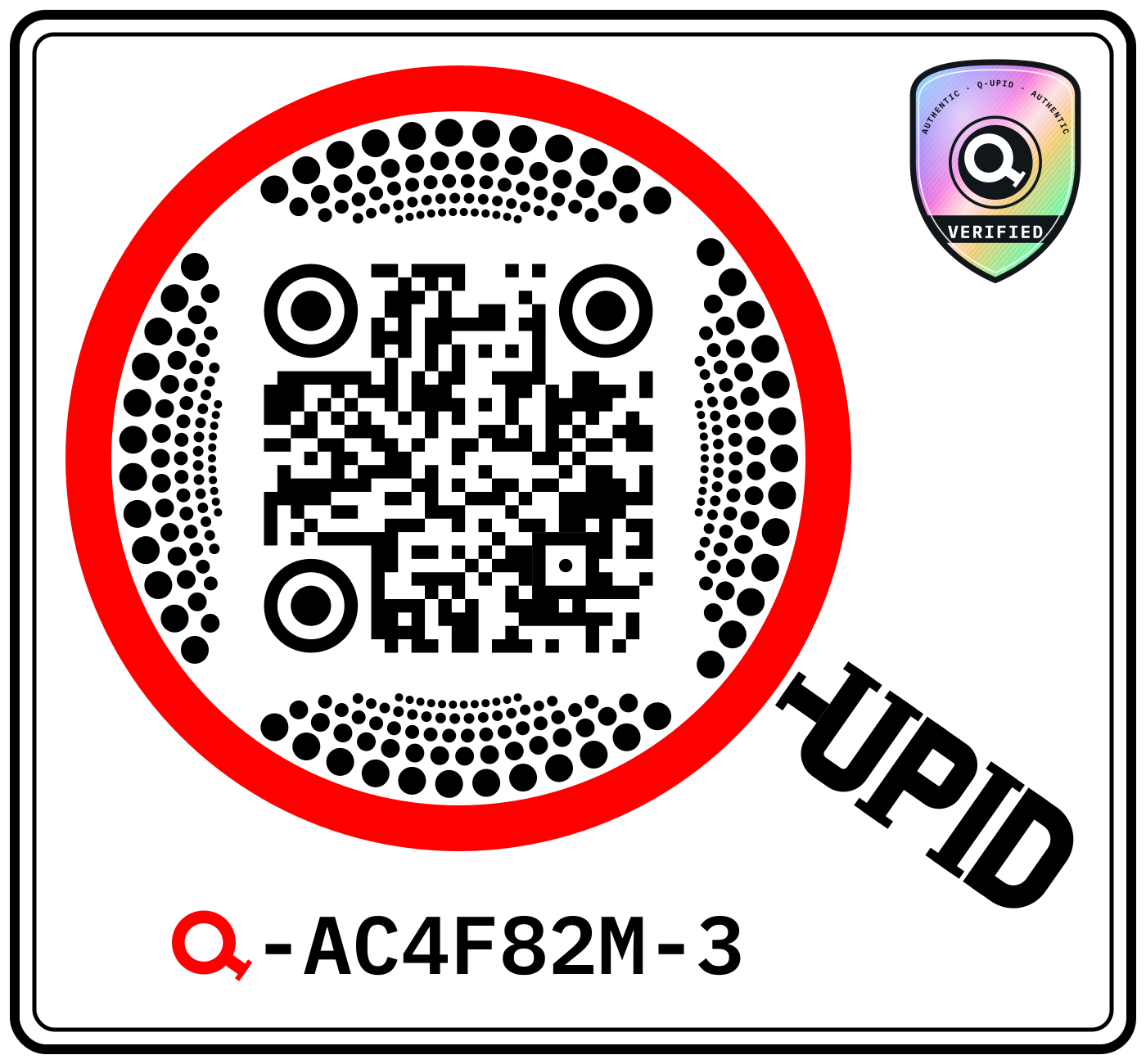
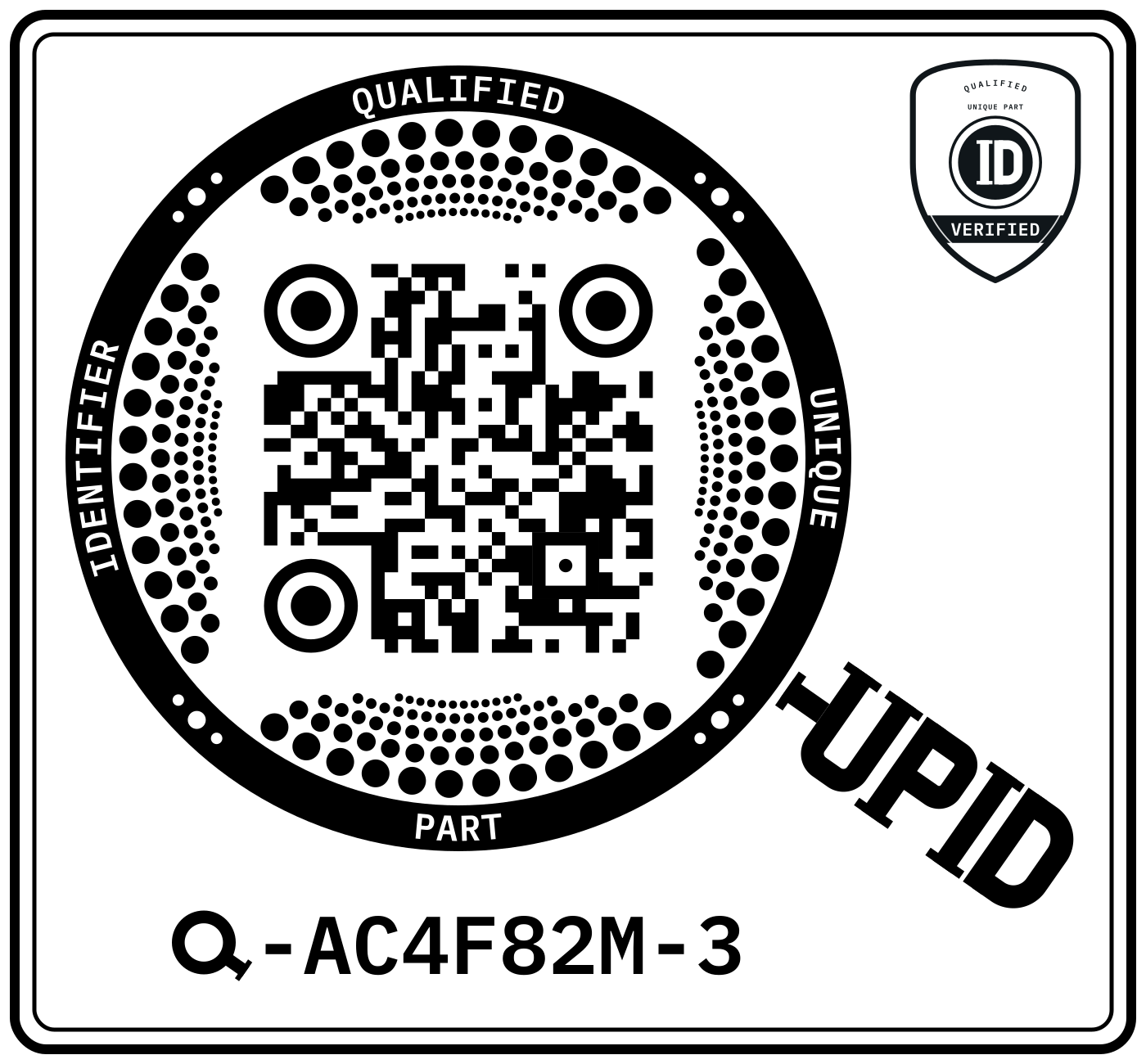
These are sample codes and have not been issued. Your issued codes come in both versions, as SVG for print and PNG for screens.
Stickers and labels
Print options
- Your own label printer. Thermal transfer at 300 dpi on matte white polypropylene or polyester gives durable black and white labels. Use the SVG, not a screenshot.
- Sheet labels. For small runs, a laser printer on matte white sheet labels works well. Print at 100 per cent with no “fit to page”.
- A label printer or packaging printer. Send the SVG and the width you want, for example “40 mm wide, black only, matte white stock”. They will want vector artwork.
- Your packaging artwork. Place the SVG in your design files at the size above, and keep the clear margin.
- Marking the part itself. Laser etching, dot peen and similar methods need their own tests. Use the black and white version and talk to us first.
Automate
Use the API
The registry has a public read API. Use it to check a Q-UPID, fetch its record, or search by part number or manufacturer. No key is needed.
GET https://q-upid.com/api/v1/items/Q-9DHK2KV-J

GET https://q-upid.com/api/v1/items/search?q=22210&field=part&match=starts&limit=10
A record is returned as JSON. A lookup answers 200 for a record, 400 for a code in the wrong format, 404 for a code not issued and 503 if the registry cannot be reached. The fields are:
q_code, manufacturer, manufacturer_url, brand_of, part_number,
state, assurance_level, allocated_on, withdrawal_reason,
evidence_kind, distributor
evidence_kind says whether a record was checked against the manufacturer's own published page or issued from a distributor catalogue listing. Distributor-reported data is kept apart and marked unverified.
Issuing codes by API is planned and is not available yet. It will be authenticated per manufacturer, so a list of part numbers from your own system can return a list of Q-UPIDs. Tell us if you would use it.
For discussion
RFID and NFC
A printed 2D code is the supported form today. Tags are open for discussion, and nothing here is final.
- NFC. A tag can carry the same address a scan opens, so a phone tap and a phone scan reach the same record. No new identifier is needed.
- UHF RFID. Better for bulk reading in a warehouse. How the Q-UPID is encoded on the chip, and which standard to follow, is not decided.
- Questions we want answered. What your readers and tags are, whether tags go on parts or on cartons, and what happens on metal.
FAQ
Questions manufacturers ask
Does it really cost nothing?
Yes. Allocating a Q-UPID is completely free, and so is keeping and printing it. Charges apply only to optional help and data tools, never to the code.
What exactly gets a Q-UPID?
One manufacturer's part. Identity rests on the manufacturer and the manufacturer's part number, kept as you write it. Descriptions give context and never decide identity.
What if the part number changes?
A new part number, or a different manufacturer name, is a new Q-UPID. If the part number stays, the Q-UPID stays, because you are saying it is the same part.
Does it replace our part numbers or our barcodes?
No. Your part numbers, SKUs and barcodes stay as they are. The Q-UPID sits alongside them and lets other systems state which part they mean.
Is anything about my part stored in the 2D code?
No. The code holds only the address of the part's record, which includes the Q-UPID. Nothing about the part is encoded in it, and the code itself means nothing.
Does scanning need an app?
No. A phone camera reads the code and opens the live record on q-upid.com.
Can I make the code bigger or smaller?
Yes, in proportion, within the size guidelines above. Do not stretch, crop, recolour or invert it.
Can a distributor get a code for my part?
Some codes are issued from distributor catalogue listings. They are marked as not yet checked against the manufacturer's own page. You can ask us to confirm them as yours.
Does a Q-UPID say one part replaces another?
No. A replacement or a compatible alternative is a relationship between two parts. Those belong in a separate layer, never inside the identifier.
Who is behind it?
Q-UPID is an initiative of Material-Masters Limited.
Manufacturer adoption pack
Everything in one download
The pack has a short guide with the print and packaging rules, a scan test sheet to print at true size, sample artwork in colour and black and white, and a parts list template to fill in and send us.